The Digital Preschooler: Balancing Screen Time with Hands-On Learning

In today’s world, even the youngest children are digital natives. Walk into any restaurant, waiting room, or family gathering, and you’ll likely see preschoolers swiping and tapping on tablets or smartphones with remarkable dexterity. Technology has become an unavoidable part of childhood, leaving many parents wondering: How much screen time is appropriate for preschoolers? What types of digital activities actually benefit young children? And how can we balance the digital world with the hands-on experiences that young children need?
This comprehensive guide explores the research-backed benefits and concerns of technology use for preschoolers, offering practical strategies to create a healthy digital balance that supports your child’s development in our increasingly connected world.
The Digital Landscape for Today’s Preschoolers
The reality of screen time for young children has changed dramatically in recent years. According to a 2025 survey by Lurie Children’s Hospital:
- 81% of children under 13 now have their own digital device
- 59% of children began using screens by age three
- Children are averaging 21 hours of screen time per week (3 hours daily)
- 49% of parents rely on screens daily to help manage parenting responsibilities
These statistics reflect a significant shift from previous generations, when television was the primary screen and content was limited to scheduled programming. Today’s preschoolers have access to unlimited on-demand content across multiple devices, from educational apps to streaming videos to interactive games.
This digital immersion presents both opportunities and challenges for young children’s development. Understanding both sides of the equation is essential for making informed decisions about your preschooler’s screen time.
What the Research Says: Screen Time and Preschool Development
Potential Benefits of Quality Digital Learning
When used appropriately, technology can offer several benefits for preschoolers:
1. Targeted skill development
Research from Aspire Early Education indicates that well-designed educational apps and games can help preschoolers practice specific skills like:
- Letter and number recognition
- Basic phonics and early reading skills
- Pattern recognition and problem-solving
- Memory and attention skills
2. Engagement and motivation
Digital content often incorporates elements that capture children’s attention through:
- Interactive feedback and rewards
- Engaging characters and storylines
- Multisensory experiences (sound, visuals, touch)
- Personalized pacing that adapts to the child’s level
3. Accessibility and inclusion
Technology can provide valuable support for children with diverse learning needs:
- Text-to-speech features for children with reading difficulties
- Visual supports for children with language delays
- Adaptive interfaces for children with motor challenges
- Translation tools for multilingual learners
4. Digital literacy foundations
Early exposure to age-appropriate technology helps children develop basic tech skills they’ll need for future learning:
- Understanding cause and effect in digital environments
- Developing basic navigation skills
- Building comfort with digital tools they’ll encounter in kindergarten
Concerns About Screen Time for Preschoolers
Despite these potential benefits, research also highlights significant concerns about screen time for young children:
1. Developmental impacts
A 2025 study published by the American Psychological Association reviewed 117 studies involving over 292,000 children and found correlations between excessive screen time and:
- Emotional and behavioral problems
- Reduced attention spans
- Language delays
- Sleep disruptions
- Decreased physical activity
2. Displacement of essential activities
Every minute spent on screens is a minute not spent on activities crucial for preschool development:
- Face-to-face social interaction
- Physical play and movement
- Hands-on sensory experiences
- Imaginative play
- Outdoor exploration
3. Content quality concerns
Not all digital content is created equal, and preschoolers often encounter:
- Fast-paced, overstimulating content that may affect attention development
- Passive viewing experiences with limited educational value
- Exposure to inappropriate content or advertising
- Addictive design features that make it difficult to disengage
4. Relationship effects
Screens can impact family dynamics in several ways:
- Reduced parent-child interaction during screen use
- “Technoference” when parent device use interrupts interactions with children
- Fewer opportunities for joint attention and shared experiences
- Screen-related conflicts and power struggles
The Unique Value of Hands-On Learning for Preschoolers
While digital learning has its place, research consistently shows that hands-on, multisensory experiences are essential for preschoolers’ developing brains. A 2025 Michigan State University study found that print-focused, hands-on activities were significantly more effective than digital games for building early literacy skills in preschoolers.
Here’s why hands-on learning remains irreplaceable:
1. Sensory integration and neural development
Young children learn through their senses, and hands-on experiences provide:
- Tactile feedback that builds neural connections
- Proprioceptive input (body awareness) through movement
- Vestibular stimulation (balance and spatial awareness)
- Integration of multiple sensory systems simultaneously
2. Three-dimensional understanding
Physical objects and experiences help children develop:
- Spatial reasoning and perspective-taking
- Understanding of weight, texture, and physical properties
- Cause-and-effect relationships in the physical world
- Fine and gross motor skills through manipulation of objects
3. Social learning opportunities
In-person activities facilitate:
- Turn-taking and sharing
- Verbal and non-verbal communication
- Emotional regulation through peer interaction
- Collaborative problem-solving
- Adult modeling and scaffolding
4. Deeper engagement and learning
Research from MeckPreK indicates that hands-on learning often results in:
- Longer sustained attention
- More meaningful connections to prior knowledge
- Better information retention
- More flexible application of concepts
- Stronger emotional connections to learning
Finding the Right Balance: A Framework for Parents
Rather than viewing technology as inherently good or bad, experts recommend a thoughtful, balanced approach that considers the quality, context, and purpose of screen time. Here’s a practical framework for integrating digital learning while prioritizing hands-on experiences:
1. Follow Evidence-Based Guidelines
Major health organizations offer specific recommendations for preschool screen time:
The American Academy of Pediatrics recommends:
- Children under 18-24 months: No screen time except video chatting
- Children 2-5 years: Limit to 1 hour per day of high-quality programming
- Co-viewing whenever possible to help children understand content
The World Health Organization suggests:
- Less sedentary screen time is better for all young children
- No more than 1 hour daily for children 2-4 years old
- Replace screen time with more active play and quality interaction
2. Prioritize Quality Over Quantity
Not all screen time is created equal. Focus on:
High-quality educational content that:
- Is age-appropriate and developmentally suitable
- Moves at a manageable pace
- Encourages interaction rather than passive viewing
- Is free from advertisements and inappropriate content
- Connects to real-world concepts
Recommended resources for finding quality content:
- Common Sense Media – Reviews apps, games, and shows by age and educational value
- PBS Kids – Research-based educational content
- Khan Academy Kids – Free educational activities aligned with learning standards
3. Make Screen Time Interactive and Social
Transform passive consumption into active engagement:
Co-view and co-play whenever possible:
- Ask questions about what’s happening on screen
- Make connections to your child’s experiences
- Expand on concepts introduced in digital content
- Model appropriate reactions and responses
Use technology to connect with others:
- Video calls with family members
- Collaborative digital activities with peers
- Sharing digital creations with others
4. Create Tech-Free Zones and Times
Designate specific boundaries for technology use:
Tech-free zones might include:
- Bedrooms (especially at night)
- Dining areas during meals
- Cars during short trips
- Outdoor play spaces
Tech-free times could include:
- The hour before bedtime (to protect sleep quality)
- Family mealtimes
- Morning routines
- Special family activities
5. Use Technology Intentionally
Be purposeful about when and why screens are used:
Consider screen time for:
- Specific learning goals (practicing letters, exploring a topic of interest)
- Connecting with distant family members
- Documenting and reflecting on real-world experiences
- Occasional entertainment during necessary waiting periods
Avoid using screens for:
- Constant background noise
- Default entertainment
- Behavior management in most situations
- Replacement for adult interaction
6. Balance Digital With Physical Activities
For every digital activity, plan corresponding hands-on experiences:
Digital-physical pairings might include:
- Watching a video about animals → Visiting a zoo or farm
- Using a letter recognition app → Creating letters with playdough
- Playing a digital matching game → Making a physical memory game
- Watching a cooking show → Preparing a simple recipe together
Practical Ideas: Blending Digital and Hands-On Learning
Here are specific ways to create a balanced approach to learning for preschoolers:
Literacy Development
Digital approaches:
- Interactive storybook apps that highlight words as they’re read
- Letter recognition games with audio pronunciation
- Simple word-building apps with visual supports
Hands-on complements:
- Daily physical book reading with discussion
- Letter hunts around the house or neighborhood
- Writing/drawing in sand, shaving cream, or with finger paints
- Creating homemade books about family experiences
Math Concepts
Digital approaches:
- Counting and number recognition apps
- Simple pattern games
- Basic shape identification activities
Hands-on complements:
- Counting objects during daily routines (stairs, snacks, toys)
- Creating patterns with blocks, beads, or household items
- Shape scavenger hunts in the environment
- Measuring ingredients while cooking together
Science Exploration
Digital approaches:
- Simple science videos showing experiments or natural phenomena
- Virtual field trips to zoos, aquariums, or nature centers
- Weather tracking apps with visual representations
Hands-on complements:
- Nature walks with observation and collection
- Simple experiments with household materials
- Planting and caring for seeds
- Sensory bins with different materials to explore
Creative Expression
Digital approaches:
- Simple drawing or music-making apps
- Stop-motion animation with child-friendly interfaces
- Digital storytelling tools with recording features
Hands-on complements:
- Open-ended art with various materials
- Dress-up and dramatic play
- Dance and movement activities
- Making music with household items or simple instruments
Managing Common Screen Time Challenges
Even with the best intentions, parents often face specific challenges around technology use. Here are strategies for addressing common issues:
Challenge #1: Screen Time Tantrums
Many parents report intense reactions when screen time ends. To minimize these conflicts:
- Use visual timers that show children how much time remains
- Establish and consistently enforce clear boundaries
- Give 5-minute and 1-minute warnings before time is up
- Plan an engaging transition activity for after screen time
- Avoid using screens right before transitions or bedtime
Challenge #2: “Just One More” Syndrome
Preschoolers often struggle with ending an activity. Try these approaches:
- Choose apps with natural endpoints rather than endless play
- Create a “parking spot” where devices rest when not in use
- Use a visual schedule showing when screen time occurs during the day
- Establish a consistent routine for turning devices off
- Provide an appealing alternative activity to transition to
Challenge #3: Managing Your Own Screen Use
Children learn from what we do more than what we say:
- Be mindful of your own screen habits around children
- Narrate when you’re using technology for a purpose
- Create tech-free times for the whole family
- Model putting devices away during social interactions
- Show enthusiasm for non-digital activities
Challenge #4: Grandparents and Caregivers with Different Rules
When different adults have different approaches to screen time:
- Have open conversations about your family’s screen time values
- Provide specific alternatives caregivers can offer instead of screens
- Create a simple visual guide for screen time rules when you’re away
- Focus on quality content rather than strict time limits for occasional care
- Express appreciation for caregivers’ efforts to follow guidelines
Signs Your Preschooler’s Screen Time May Need Adjustment
While some screen time can be appropriate, watch for these warning signs that may indicate a need to reassess your approach:
- Difficulty transitioning away from screens without major tantrums
- Decreased interest in non-screen activities
- Sleep difficulties or changes in sleep patterns
- Less physical activity or outdoor play
- Reduced social interaction or conversation
- Irritability or behavior changes after screen use
- Complaints of headaches or eye strain
- Using screens to avoid difficult emotions or situations
If you notice these signs, consider gradually reducing screen time while increasing engaging alternatives.
The Future of Digital Learning for Preschoolers
As technology continues to evolve, so will its role in early education. Emerging trends include:
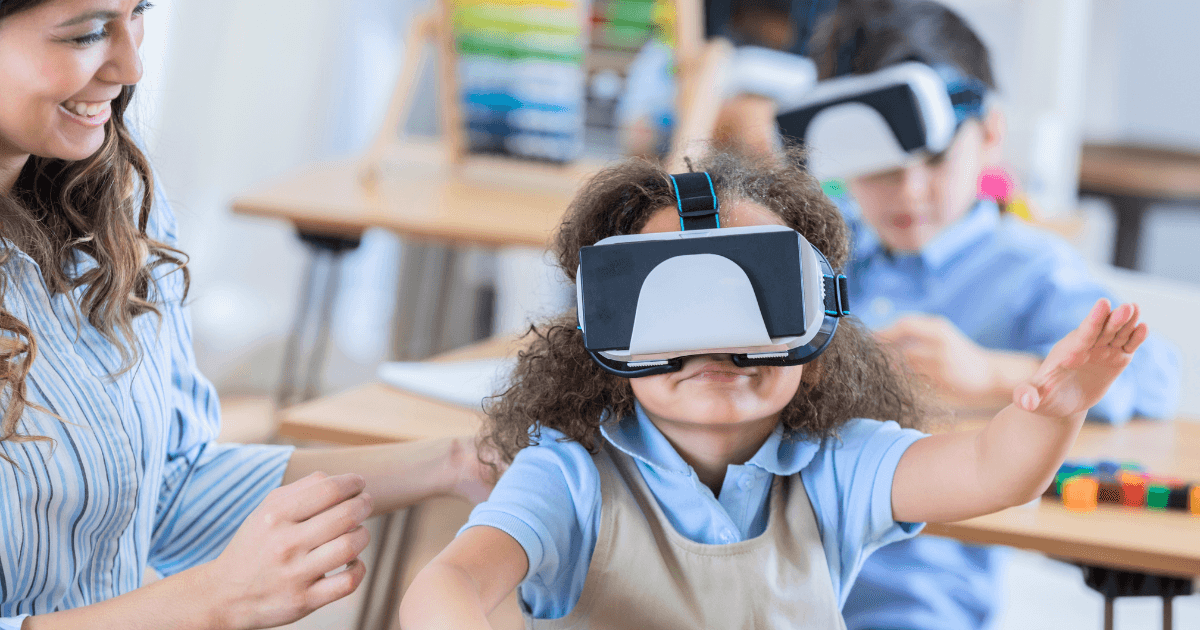
- Augmented reality (AR) experiences that blend digital content with the physical world
- AI-powered adaptive learning that adjusts to a child’s individual needs and pace
- More sophisticated assistive technologies for children with diverse learning needs
- Improved parent controls and monitoring tools for managing content and time
While these innovations may offer new benefits, the fundamental principles remain the same: technology should supplement, not replace, the hands-on experiences and human connections that are essential for preschoolers’ development.
Conclusion: Finding Your Family’s Digital Balance
There’s no one-size-fits-all approach to technology use for preschoolers. The right balance depends on your child’s temperament, interests, and needs, as well as your family’s values and circumstances. What matters most is being intentional about how technology fits into your child’s overall learning experience.
Remember that perfect balance isn’t the goal—thoughtful integration is. By combining the best of both digital and hands-on approaches, you can help your preschooler develop the skills they need for success in both the digital and physical worlds.
As Kids First Services notes, “Technology should be seen as a tool in the educational toolkit, not as a replacement for traditional learning methods.” When used thoughtfully, digital tools can enhance your child’s learning journey while still preserving the irreplaceable value of hands-on exploration, physical play, and face-to-face connection.
How do you balance screen time and hands-on learning in your family? Share your experiences and questions in the comments below!